The cart tab was the first screen to move. It lost its ui style object and StyleSheet import, gained cover thumbnails, a Remove button with a pressed state, and a line for an empty cart, and it now reads every color from the palette in global.css. The rest of the cart is plain utility classes:
      {lines.length === 0 && <Text className="text-ink/60">Your cart is empty.</Text>}
      <Text className="text-2xl font-bold text-ink">Total ${total.toFixed(2)}</Text>
      <Link href={user ? '/checkout' : '/sign-in'} asChild>
        <Pressable className="items-center rounded-lg bg-brand p-3 active:opacity-80">
          <Text className="font-bold text-surface">Checkout</Text>
        </Pressable>
      </Link>
With four books in the cart, the same screen was captured with the emulator's night mode off and on (cmd uimode night no, then yes). Nothing in the component changed between the two; only the CSS variables did, and the header and tab bar followed through Expo Router 6,418 's DarkTheme:
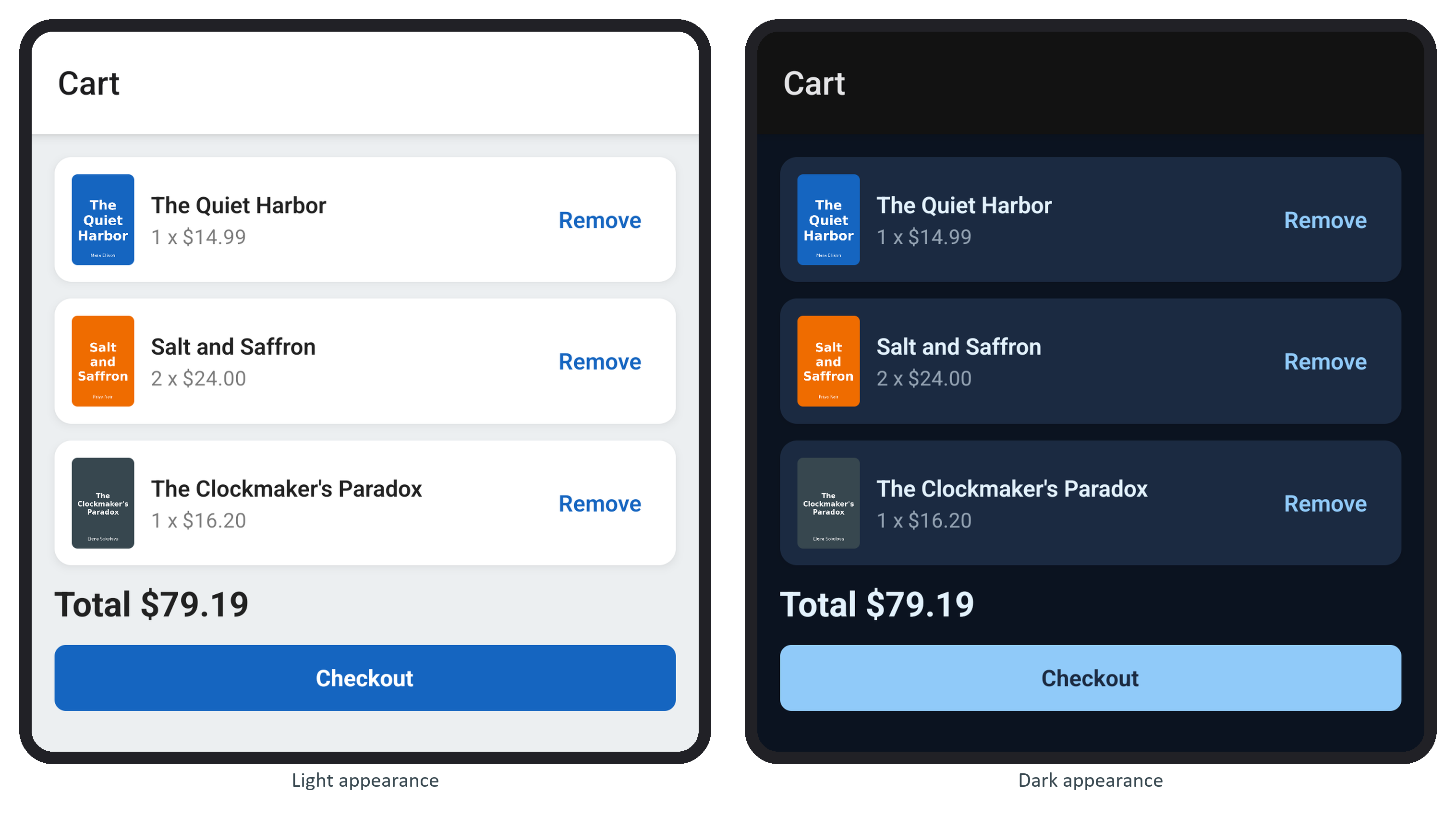
The checkout label uses text-surface, so it keeps its contrast in both. The other screens still use StyleSheet, and they keep working: migrate each one when you next change it, and delete a color from src/demos/ui.tsx once nothing imports it.