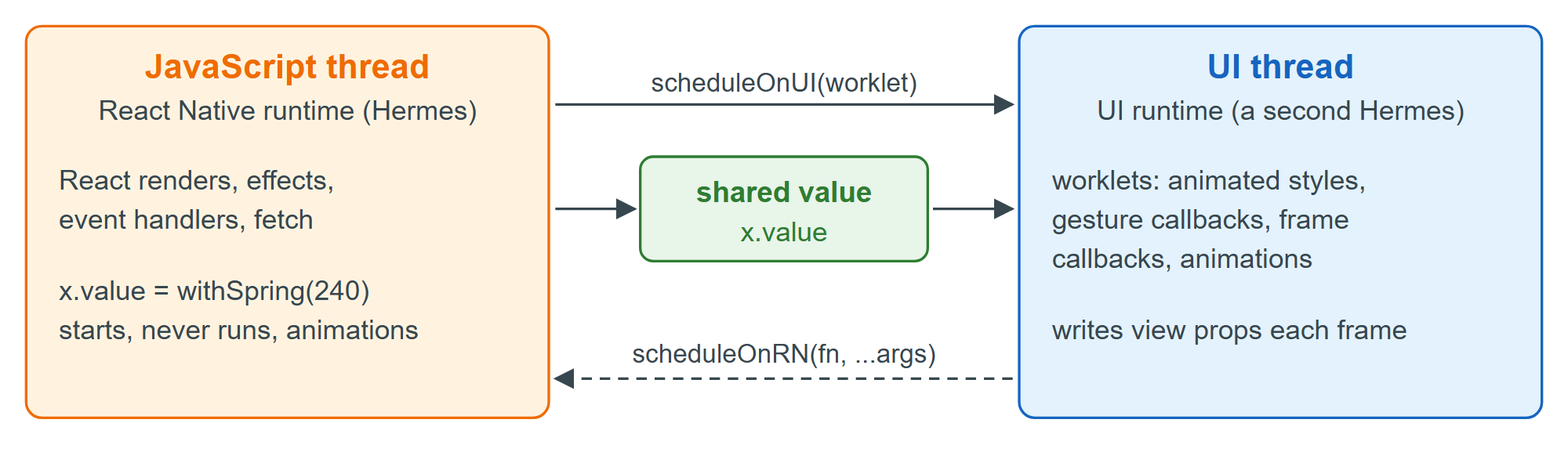
A worklet is a function marked 'worklet'. The worklets Babel 41,624 plugin records its source and captured variables so it can be recreated in the UI runtime, a separate Hermes 11,328 instance on the UI thread. The callbacks you pass to useAnimatedStyle(), useFrameCallback(), animation callbacks and Gesture Handler 6,788 gestures become worklets automatically; helpers they call need the directive. scheduleOnUI() runs a worklet on the UI thread and scheduleOnRN() sends a call back to a function defined on the JavaScript side, here a module-level say() that calls console.log():
const where = () => {
  'worklet';                                 // copied to the UI runtime by the Babel plugin
  return getRuntimeKind() === RuntimeKind.UI ? 'UI runtime' : 'React Native runtime';
};
// ...inside UiThread:
  useFrameCallback(() => { frames.value += 1; });   // runs on the UI thread every frame
  useEffect(() => {
    angle.value = withRepeat(withTiming(360, { duration: 1000, easing: Easing.linear }), -1);
    console.log('effect runs on the', where());
    scheduleOnUI(() => {
      'worklet';
      scheduleOnRN(say, 'scheduled worklet runs on the', where());
    });
  }, [angle]);
  const block = () => {                             // freeze the JavaScript thread for 2 s
    const f0 = frames.value, t0 = Date.now();
    while (Date.now() - t0 < 2000) { /* busy */ }
    console.log('JS blocked 2000 ms; UI frames meanwhile:', frames.value - f0);
  };
Opening the screen and pressing the button that calls block():
 LOG  effect runs on the React Native runtime
 LOG  scheduled worklet runs on the UI runtime
 LOG  JS blocked 2000 ms; UI frames meanwhile: 40
The same where() ran in both runtimes. While JavaScript spun for two seconds, the UI thread kept rotating the square and counted 40 frames (the emulator renders in software, about 20 frames a second under load); a JavaScript-driven animation would have frozen for the whole two seconds.